Best practices regarding the use of channels and transmission power in Fortinet APs.
This article describes suggested best practices for wireless network compliance and better resource utilization.
FORTINETWIRELESS
1/11/20265 min read
Country Selection
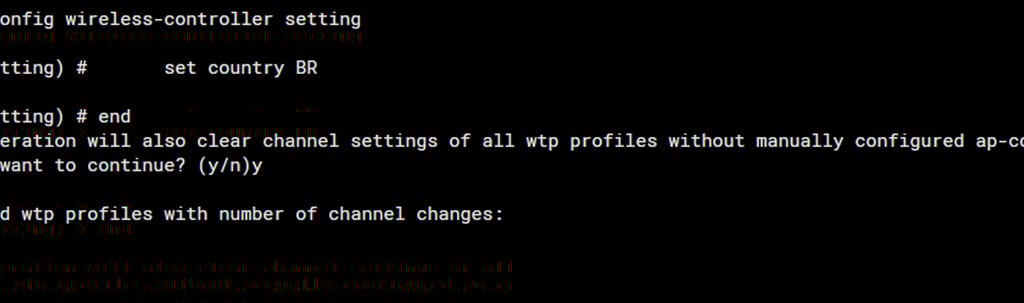
The first configuration we suggest to ensure the environment complies with regulatory bodies such as the FCC (Federal Communications Commission) or, in Brazil, ANATEL, is to select the country where the AP is being configured. This way, channels and power levels prohibited in the selected territory will not be used. The command:
config wireless-controller setting
set country BR
end
Result after aply command.
An important piece of information to consider regarding 2.4 GHz radios is that this technology has 14 channels. For Brazil, we can use channels 1 through 13. Channel 14 is restricted to Japan. Channels 12 and 13, although permitted by ANATEL for use in Brazil, are prohibited in the United States and Canada, which directly causes incompatibility with various devices such as cell phones and laptops.
Therefore, to avoid channel overlap, known as adjacent interference, the recommended channels are 1, 6, and 11, all at 20 MHz.
Radio Resource Provisioning
The second parameter we will use is to avoid interference between access points. FortiOS offers Distributed Automatic Radio Resource Provisioning (DARRP). Through DARRP, each FortiAP unit autonomously and periodically determines the most suitable channel for wireless communications.
FortiAP units select their channels in a way that avoids interference with each other in large-scale deployments where multiple access points have overlapping radio ranges. Continuing with the example of 2.4 GHz radios, consider the hypothetical scenario of a corridor where we have 3 unmanaged APs. To avoid interference between them, each AP will be configured on a channel using the 3 best channels: 1, 6, and 11. For corporate environments, this scenario is unusual and inefficient.
Therefore, with DARRP, channel selection is optimized by monitoring the channels of neighboring APs and performing periodic background scans to collect signal strength. To ensure that the FortiGate switches APs to the correct channel when usage increases, verify that this setting is enabled in your FortiAP Profile:
To ensure that the FortiGate switches AP channels when usage increases, verify that this setting is enabled in your FortiAP Profile:
config wireless-controller fortiap-profile
edit "Seu_Profile"
config radio-1
set darrp-optimize 10*
set darrp-threshold 40*
end
next
end
*Optimizes the channel every 10 minutes if necessary.
*Only switches if interference rises above 40%.
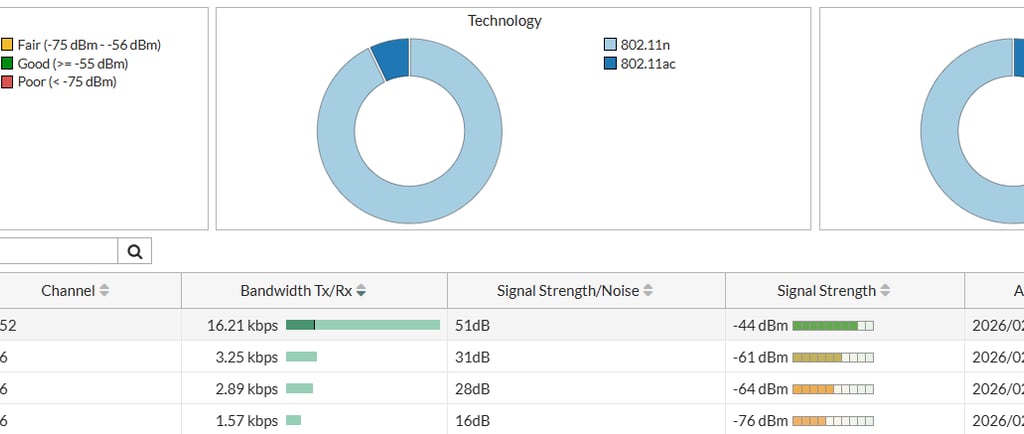
Monitor Channel Utilization
This is a passive feature, for analysis and monitoring purposes. It can be used for troubleshooting and analyzing radio channel usage.
5GHz
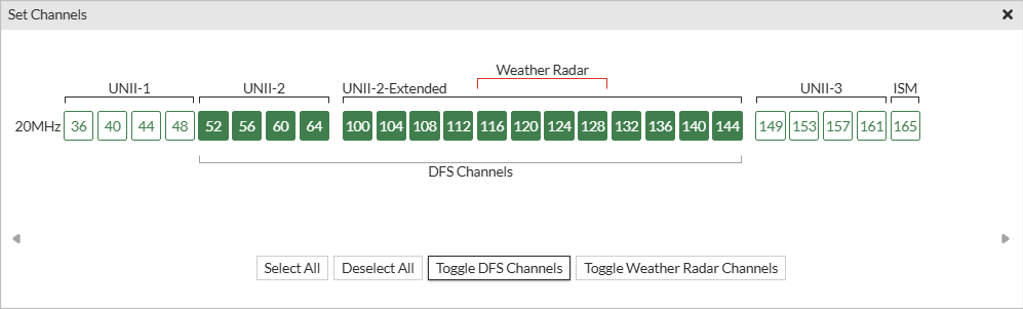
5 GHz has a much wider bandwidth than 2.4 GHz, offering more channels and less interference. For Brazil, we have 25 available channels with 20 MHz each.
There is no channel overlap when used with a 20 MHz bandwidth because each channel occupies exactly its designated band.
DFS
Dynamic Frequency Selection (DFS) is a feature that allows Wi-Fi devices to operate on 5 GHz frequencies that are originally reserved for radar systems, such as weather, military, and airport radars.
The 5 GHz band is divided into several channels. Some of them are "free to use" (Non-DFS), but most of the bandwidth available in this frequency is shared with radars.
To avoid interference, the law requires Wi-Fi to "listen" to the environment before transmitting on these protected channels. If the router detects a radar signal, it must leave that channel immediately so as not to interfere with critical systems.
UNII (Unlicensed National Information Infrastructure) are regulated sub-bands within the 5 GHz frequency for Wi-Fi. UNII-1 is low power and recommended only for indoor use, which is the opposite of UNII-3, which is high power and recommended and permitted for outdoor use. The UNII-2A and UNII-2C require the mandatory use of DFS. Both require the use of TPC, Transmit Power Control.
Radio Power
To determine the ideal power in environments with multiple APs with overlapping signals, a site survey is highly recommended. In cases where analysis is not possible, avoid setting the maximum power unless necessary. With the "Transmit power mode," the FortiGate will automatically adjust the power range based on nearby APs.
The recommended maximum transmission power for the 5 GHz band is 14 dBm, with 17 dBm approaching the limit considered "excessive."
The standard for both radios is the range of 10 to 17 dBm. ANATEL (Brazilian National Telecommunications Agency) allows up to 36 dBm on 2.4 GHz radios and 23 dBm for low channels (36 to 48) and 30 dBm for high channels (149 and 165) on 5 GHz. The Forti AP allows up to 25 dBm, which is below the Brazilian regulatory limit.
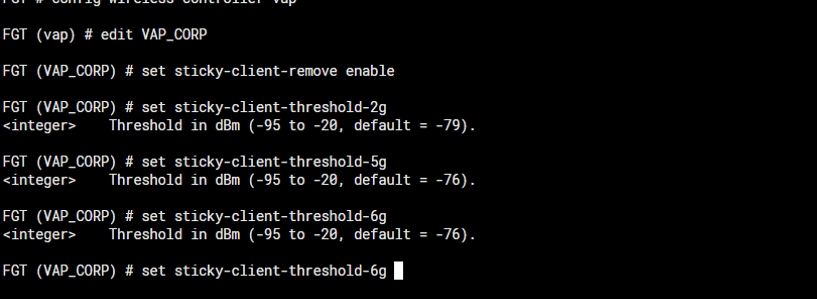
Another point is that the transmission power should not be set too high, as this can cause transmission power asymmetry between the client device and the FortiAP. This means that the client device "hears" the FortiAP better than the FortiAP "hears" the client, which can cause excessive retransmissions, excessive changes in data rate, and client persistence, resulting in a poor user experience. Reference document: Signal Strength Issues. It is important to know that the choice of radio is made by the client. Therefore, a good practice is to configure the "Ignoring Weak Client" or "sticky" option, available only via CLI, using the following syntax:
config wireless-controller vap
edit <vap-name>
set sticky-client-remove enable|disable
set sticky-client-threshold-2g <minimum RSSI (dbm) required to maintain connection> (-95 to -20, default = -76)
set sticky-client-threshold-5g <minimum RSSI (dbm) required to maintain connection> (-95 to -20, default = -76)
set sticky-client-threshold-6g <minimum RSSI (dbm) required to maintain connection> (-95 to -20, default = -76)
end
end
Enable Frequency Handoff
Encourages dual-band devices to use the 5 GHz band for better performance. The wireless controller monitors the usage of the 2.4 GHz and 5 GHz bands and signals clients to switch to the less used frequency.
Enable FortiAP Handoff
The wireless controller signals a client to switch to another access point. High-traffic areas: Improper placement can result in some access points being overloaded with many clients, while others remain underutilized.
Bandwidth bottlenecks: Overloaded access points have difficulty providing adequate bandwidth to all connected devices, resulting in slow internet speeds.
Enabling Frequency Handoff and Access Point Handoff in areas where this feature is not needed, or in Wi-Fi networks with little or no tuning, may cause unexpected disconnections in wireless clients.
Proceed with caution and preferably only in high-density environments.
Related external links:
Understanding Distributed Radio Resource Provisioning | FortiAP / FortiWiFi 7.6.5 | Fortinet Document Library
How frequency handoff works and when to c... - Fortinet Community