Bundle vs. Install
Understanding the difference between the Bundle and Install modes is essential for managing modern network infrastructures, especially when dealing with newer hardware or pursuing enterprise-level certifications.
CISCO
6/29/20263 min read
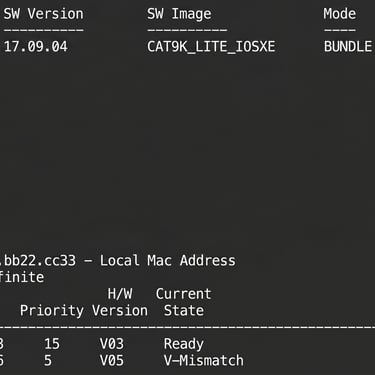
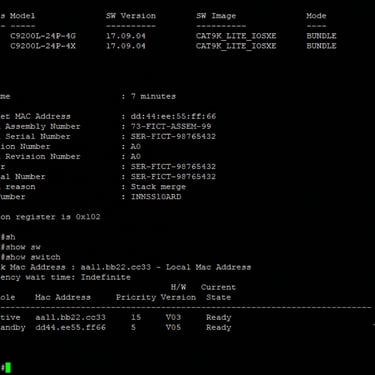
One day, I was stacking two switches from the 9000 series. Even though they had the same image and were compatible models, the stack status kept showing "V-mismatch" and wouldn't form the stack.
While troubleshooting, I noticed that the switch set as the primary was running IOS in "Install Mode," while the one with the lower priority was in "Bundle Mode."
Later on, we'll see how to fix this so that in situations like this, the adjustment can be made properly.
Bundle Mode (The Traditional Mode)
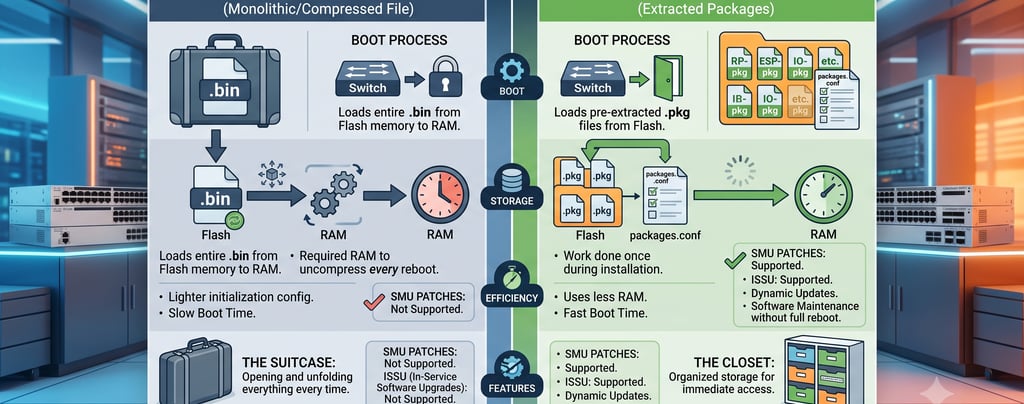
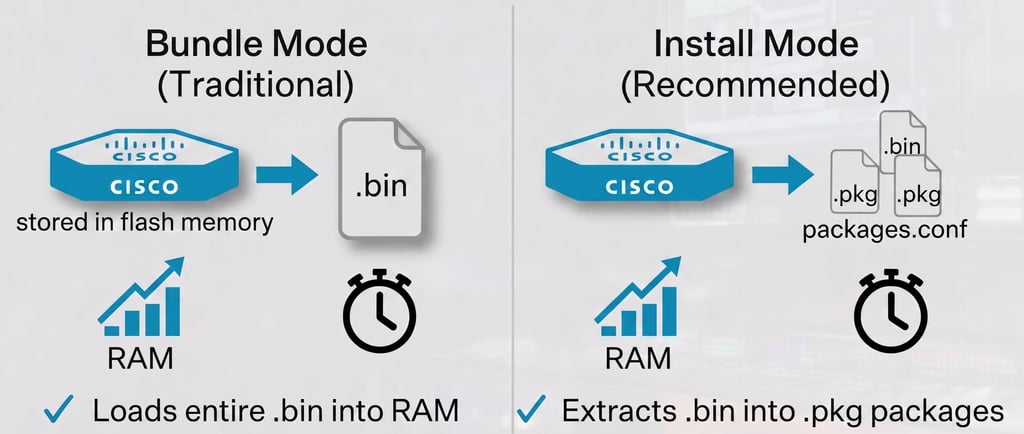
Think of Bundle Mode as a compressed file (.zip). In this mode, the switch points directly to the monolithic image file (.bin) in the flash memory.
How it works: During the boot process, the switch needs to take this entire .bin file, uncompress it, and extract it into the RAM to be able to load the operating system.
The problem: Because it performs this extraction every time it reboots, the boot time is noticeably longer and the initial RAM consumption is higher. It is the legacy method, typical of older generations of switches.
Install Mode (The Recommended Mode)
Think of Install Mode as already extracted files in organized folders. In this mode, the original .bin file is "expanded" (installed) inside the flash into several smaller packages (.pkg). The switch doesn't boot from the .bin, but rather from a configuration file called packages.conf, which tells the hardware exactly which packages to load.
How it works: The heavy lifting of uncompressing was done only once, at the time of installation. During boot, the switch reads the packages.conf and loads the .pkg files directly into memory.
The advantage: Booting is much faster and consumes less RAM. In modern enterprise network architectures—like in Cisco Catalyst 9500 stacks or 9200 uplinks—Install Mode is not just recommended, it is the absolute standard. It is also a technical prerequisite for using advanced features, such as Software Maintenance Upgrades (SMUs) and ISSU (In-Service Software Upgrade), allowing network upgrades with no downtime.
Summary of Differences
Converting from Install Mode to Bundle
The reverse conversion (going back to the monolithic .bin file) is generally not recommended for day-to-day operations, but it might be necessary in specific troubleshooting or recovery scenarios.
#conf t
#no boot system bootflash:packages.conf
#boot system bootflash:cat9k_iosxe.17.09.08.SPA.bin
#end
#wr mem
#reload
After the reload/reboot, check the result:
#show version | i Mode
#show boot
Converting from Bundle Mode to Install Mode
This is the most common and highly recommended conversion. To do this, you must already be running the switch in Bundle Mode (booted from the .bin file) and need to extract this file to create the packages.conf.
Check the current mode:
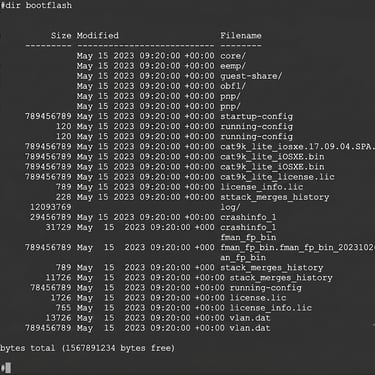
#dir bootflash:
#show version | i Mode|System image
Confirm that the .bin image file exists, for example:
cat9k_iosxe.17.09.04.SPA.bin
Run the conversion command:
#install add file bootflash:cat9k_iosxe.17.09.04.SPA.bin activate commit
What the switch will do:
Extract the packages
Create the packages.conf file
Change the boot setting to Install Mode
After the conversion is done, we can proceed and reload the switch.
After the reload, check again:
#show version | i Mode #show boot
You should see:
BOOT mode = INSTALL
Conclusion
In my case, I had to convert the switch to "Bundle Mode" on the day of the activity because the Core switch was already in production running in that mode and could not be reloaded. Later, during a new maintenance window, we converted both to the mode recommended by the manufacturer.
Before proceeding with any activities in a production environment, remember to:
Have a valid change request (change control) approved;
Confirm that the .bin image file actually exists in the bootflash: (dir bootflash:);
Make sure both switches are running the same version and are in the same mode (either Bundle or Install).
For Catalyst 9200/9300 series switches, the best practice is to keep both switches in Install Mode, as this is the mode recommended by Cisco.